Code-3 Banshee Instrukcja Użytkownika Strona 6

  • Pobierz
  • Dodaj do moich podręczników
  • Drukuj
Przeglądanie stron 5
6
Input Polarity Conguration
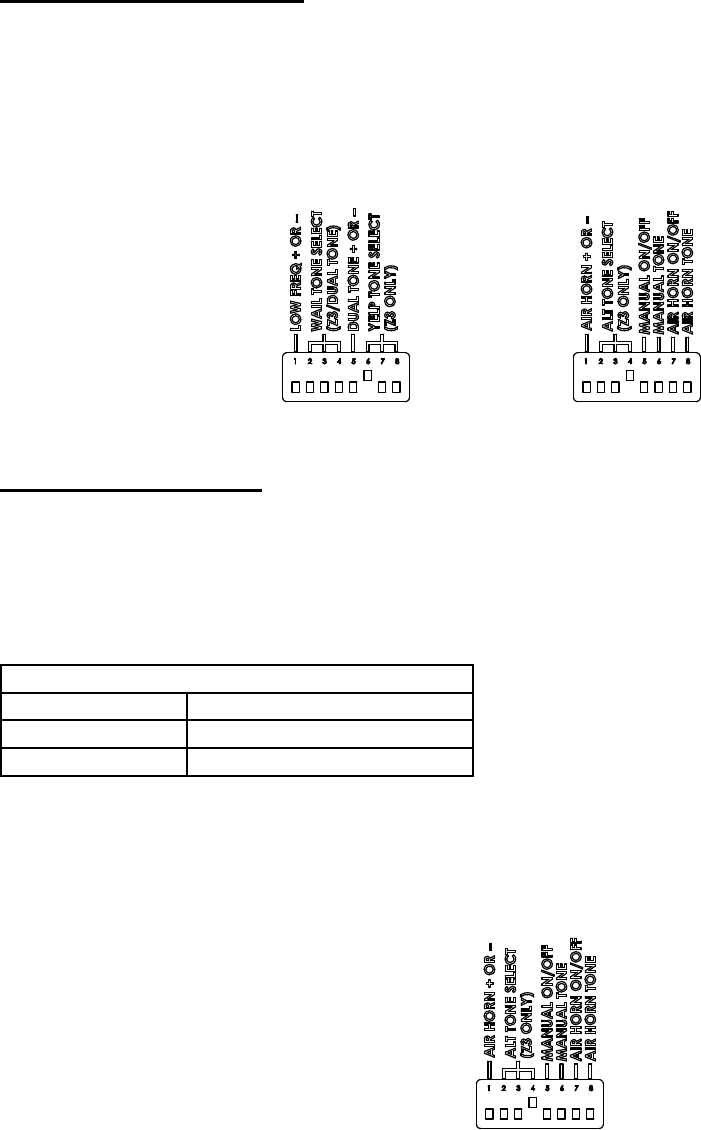
The Banshee has three congurable inputs (Low Frequency, Dual Tone, Air Horn). Each input can be congured for negative or positive activation.
This provides for easy installation into systems that provide a ground signal or a +12VDC signal. These inputs are designed for low current
activation of the Banshee features. The Banshee ships with all inputs set for positive activation. To change any input to negative activation, move
the appropriate DIP switch into the ‘UP’ position.
For each input see the following gures:
Low Frequency input - Figure 7, Position 1.
Dual Tone input - Figure 7, Position 5.
Air Horn input - Figure 8, Position 1.
Additional Z3 Functions
The Banshee can be congured to generate tones when the Z3 Control Head MANUAL or AIR HORN buttons are pressed. The MANUAL feature
can be enabled or disabled and congured to operate the Manual Wail or Wail Stop tones. The AIR HORN feature can be enabled or disabled.
When this feature is enabled, the Banshee will generate the Electronic Air Horn tone.
Z3 MANUAL Operation - To enable the MANUAL feature, move the appropriate DIP switch to the ‘Up’ position (see Figure 9, Position 5).
To congure the MANUAL tone, set the DIP switch according to Table 8 (reference Figure 9).
Table 8: Z3 MANUAL Tone Conguration
Switch Position 6 Conguration
Down *Manual Wail
Up Wail Stop
*Factory Default Setting.
Z3 AIR HORN Operation - To enable the AIR HORN feature, move the appropriate DIP switch to the ‘Up’ position (see Figure 9, Position 7). If this
feature is enabled, the Banshee will generate the Electronic Air Horn tone when the AIR HORN button on the Z3 Control Head is pressed.
Note: This feature should not be enabled for use in vehicles that must meet California Title 13 compliance. The Air Horn input can be used with a
relay (user supplied) that will disable it in compliance with California Title 13.
Figure 7 Figure 8
Figure 9
Przeglądanie stron 5
1 2 3 4 5 6 7 8 9 10 11 12

Komentarze do niniejszej Instrukcji

Brak uwag